
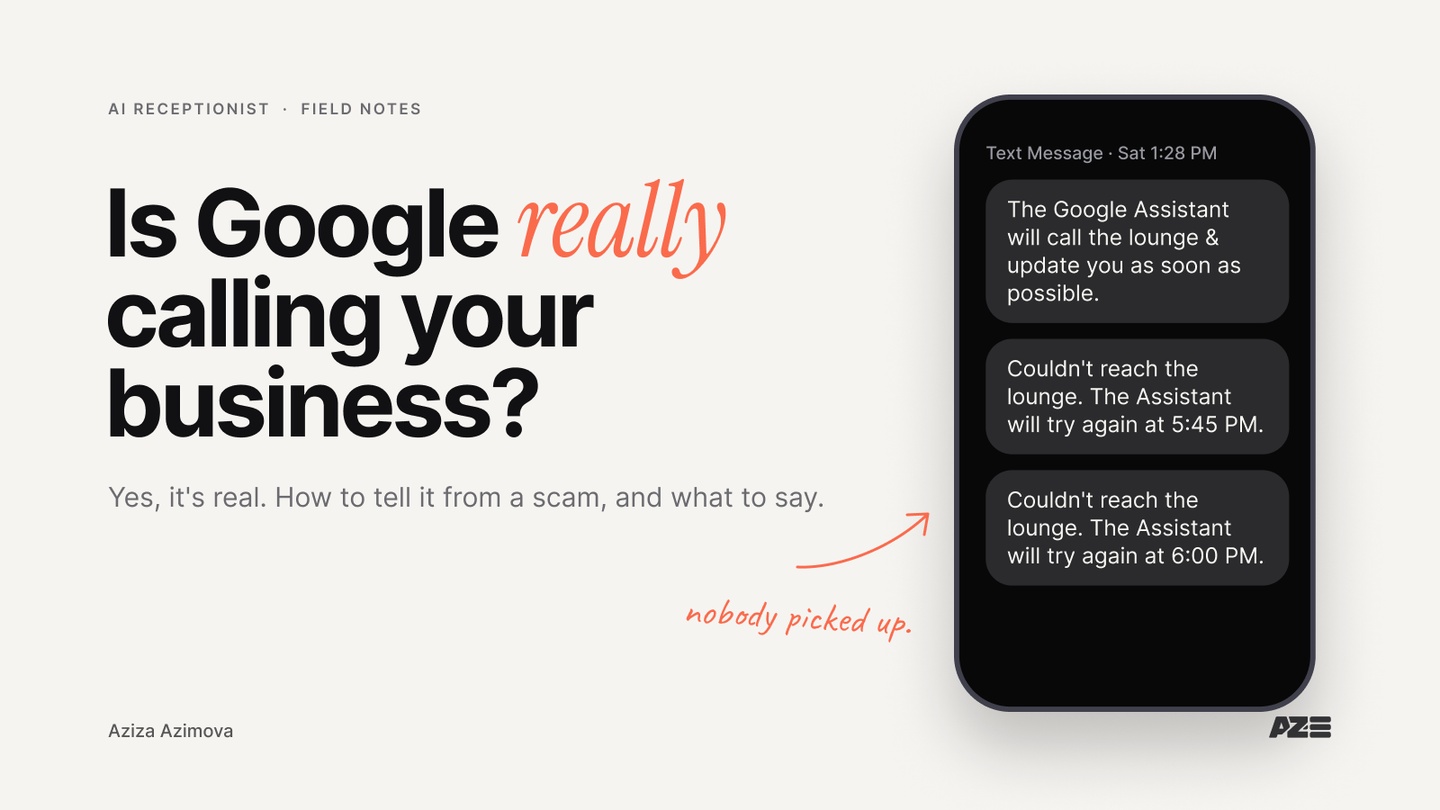
It was my birthday, and I wanted a table at a lounge in North Miami. Nobody answered when I called, and there was no way to book online. So I let Google's AI try for me. It asked how many people, what day and what time, and said it would keep calling.
Then the texts came: "Couldn't reach the lounge. The Assistant will try again at 5:45 PM." Then 6:00 PM. Then 6:00 PM again. Nobody ever picked up. My brother finally called and got the table.
That lounge will never know Google called it all afternoon. It won't show up in any missed-calls report. And it's happening to businesses everywhere right now.
Why is Google calling my business?
Google calls your business for two reasons: a customer asked Google's AI to check your prices or availability, or Google's automated assistant is confirming details on your Business Profile, like your hours. Both are real. Calls that ask you to pay for your listing are not from Google.
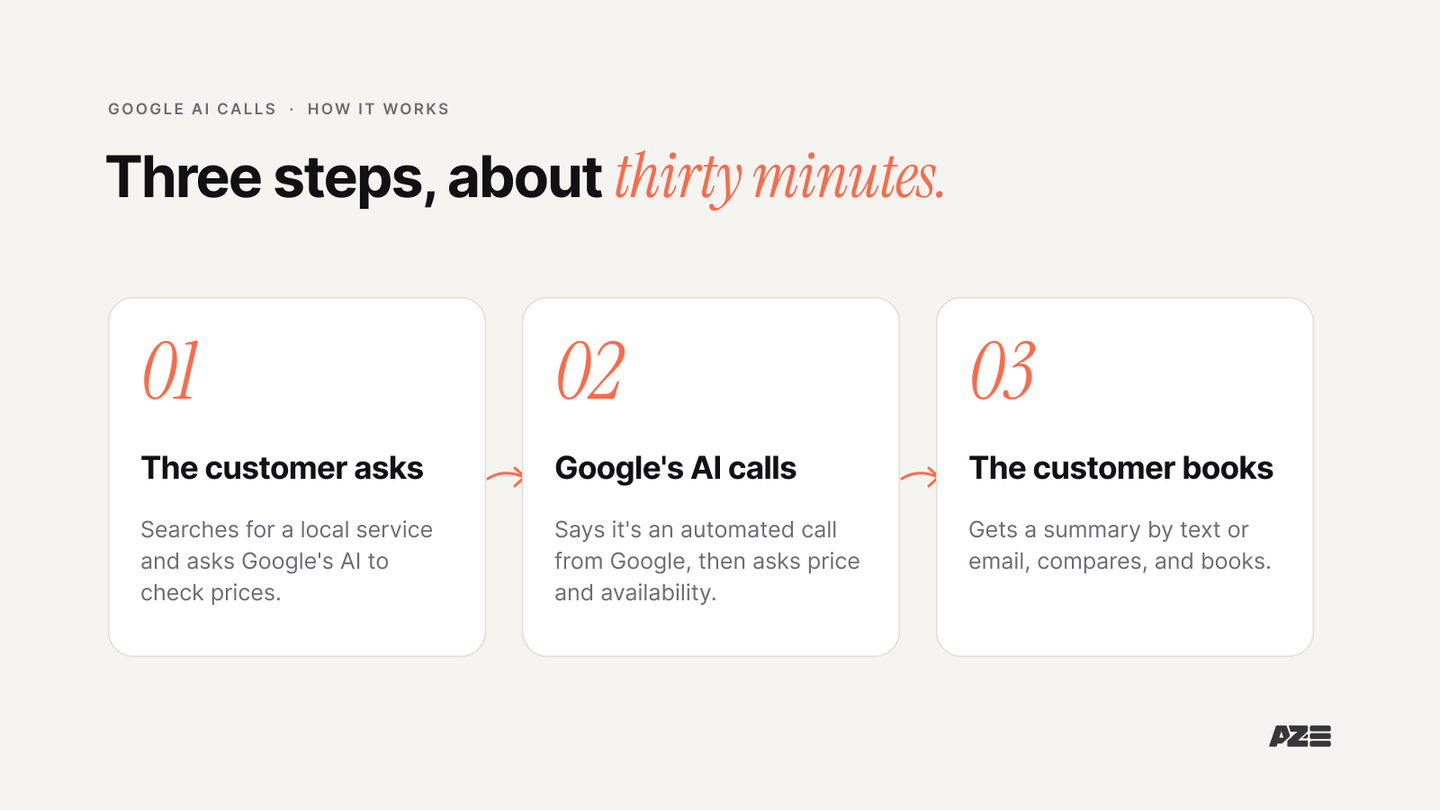
The customer calls come first. Google's AI calls because a customer asked it to. When someone searches for a local service, Google can offer to "Have AI check pricing" or check availability for them. The customer answers a few questions, and Google's AI calls several nearby businesses to collect pricing and availability. The customer gets a summary of the options by text or email, usually in about 30 minutes.
Here's the timeline so far:
- January 2025: "Ask for me" launches as a Search Labs test.
- July 16, 2025: "Have AI check pricing" goes live in Google Search in the US, for services from pet grooming to dry cleaning (Google).
- September 14, 2026: Google adds a "Collected Info" tab to Business Profile that shows what its automated calls and messages recorded about your business (Search Engine Watch).
- September 24, 2026: Google starts testing "Call for Me," where Gemini calls businesses from the customer's own phone number to book, reschedule, check stock or wait on hold, while the customer watches a live transcript (TechCrunch). The same article notes Meta's AI can already make calls for users.
The calls grew out of Google Duplex, the voice AI Google first showed booking restaurant tables in 2018. Gemini powers the newest test, "Call for Me."
So the old path was: customer searches, reads your website, calls you. The new one is: customer → their AI → your business.
What does Google's AI ask when it calls?
Google's AI asks the questions the customer would ask: your price for a specific service, whether you have availability on a given day, your hours, and sometimes whether you have an item in stock. It tells you at the start that it's an automated service from Google, the call is recorded, and it never asks for payment.
A plumber on Reddit shared his first two calls from Google's AI after starting his company. The first asked what he'd charge to install a gas pipe. He said "it depends on a lot of things" and hung up. The second asked his hours, "even though my hours are stated on my Google business profile," then the price of a faucet install.
Those are normal customer questions. The only new part is who's asking them.
Should you answer Google's AI calls?
Yes. Behind every Google AI call is a real customer comparing businesses, and the summary they get is built from the businesses that answered. If you hang up, don't pick up or give nothing useful, you are most likely left out of that comparison. Google doesn't say this outright, but the summary can only include what it collected.
Most businesses aren't answering well yet. When Invoca studied Google's AI pricing calls (vendor research), 26% went unanswered, and about half of the businesses that picked up gave no price.
26%
of Google's AI pricing calls to businesses went unanswered. About half of the businesses that answered gave no price.
And customers want this. In Accenture's 2026 survey of more than 25,000 consumers, 74% said they would hand routine tasks to an AI agent.
Some of those customers have good reasons. In the same Reddit thread, a customer wrote that they have autism and social anxiety and hate making calls; when they found this feature, "I was in heaven." Then they tried it on plumbers, and most "couldn't be reached."
I hate calling businesses too, and it's not the phone. It's the redundant work: calling around, holding, asking the same three questions. My brain is wired for strategic work, so I'd hand that to AI every time. A customer like me is exactly who sends the AI.
How do you answer when you can't quote over the phone?
You don't need to quote the job. You need to give the AI something true to pass on: your service-call or consultation fee, a typical price range, and the next step. "Our diagnostic visit is $X. Most faucet installs run between $Y and $Z. Send photos to this number and we'll quote within a day."
The plumbers in that thread have a fair point. One wrote, "Plumbing is conditions, access, parts, risk, and cleanup." A gas line can't be priced from a phone call. The best reply in the thread solved it: give "the one number you can stand behind every time," your service-call or diagnostic fee, then a wide range, then anchor the next step: photos, a quick call with the homeowner, or a site visit.
Most of the other replies did the opposite:
"If you need or want the work, then $5. Lowball it. Then if a real person calls, blame the AI."
It's funny until you remember who's on the other end: a customer, deciding who to hire.
Here's how the common answers compare:
| The AI asks | A good answer | An answer that loses the job |
|---|---|---|
| "How much do you charge for X?" | Your starting price or fee, a typical range, and how to get an exact quote | "It depends," then hanging up |
| "Can you take a booking on Saturday?" | Yes or no, the open times, and how to book | No answer, or "call back later" |
| "What are your hours?" | Your hours, matching your Google Business Profile | Hours that differ from your listing |
| A job that needs a site visit | Your call-out fee and what you need first (photos, address, a quick call) | A joke price like "$5" |
| Anything you can't answer | Who will follow up, how, and by when | Silence |
That's not an AI problem. It's a rule nobody wrote down. Your front desk can't follow a quoting rule that only lives in your head.
How can you tell if it's really Google calling?
A real Google call says at the start that it's an automated service from Google, asks about a specific service, price, booking or detail on your listing, and never asks for payment. Google says it will never ask for a one-time password or PIN, and never tries to get you to pay to keep, verify or reinstate your Business Profile. A caller who does is a scam.
So there are three kinds of "AI" calls hitting your front desk:
| Caller | What it says | What to do |
|---|---|---|
| Google's AI, for a customer | "This is an automated call from Google" + a price, availability or booking question | Answer it: price or fee, availability, how to book |
| Google confirming your listing | Asks about hours, services, parking or walk-ins | Answer accurately; it can update your Business Profile |
| A "Google listing" scam or sales robocall | You need to pay to keep, verify or rank your listing | Hang up; Google doesn't charge for Business Profile |
The hard part is that all three sound like AI, so busy staff hang up on all three.
I watched this happen at a client's office. During one meeting, AI called the front desk about six times in an hour. She hung up on every one. "GRRR… It's a scam. They're trying to sell me something."
A lot of them are. But some of those calls were customers' assistants asking about hours, prices and Saturday availability. On the phone, the sales bot and the customer's assistant sound the same, and a person can't sort them in the first five seconds.
That's a job for your own AI. A properly set-up AI receptionist:
- Screens out the sales and scam calls.
- Answers the customer's AI with your real hours, prices and policies.
- Books the next step, or brings in a person when it should.
One contractor in that thread already does a version of this: "I have my AI respond to the AI caller. They stay on the phone for hours asking each other questions." AI talking to AI is going to be normal.
Call Sable, our AI receptionist
Ask her what a customer's AI would ask your business: prices, hours, a Saturday booking. Hear how an AI front desk answers.
Does Google call about your business listing?
Yes. Since September 2026, Google's automated assistant can call, text or WhatsApp your business's verified number to confirm details like opening hours, services, parking and walk-ins. What it learns shows up in a new "Collected Info" tab in your Business Profile, with the source and the date. It never asks for money.
You can delete entries in Collected Info, but deleting one doesn't undo a change already live on your listing. Google can also update your profile when it gets reports that information is out of date.
In other words, whatever your phone says (or doesn't say) can become what Google shows about you. Check the tab every month, and make sure whoever answers your phone gives the same hours and services your listing does.
How do you stop Google calls about your business?
To stop Google's AI calls for customers, say so during the call, or turn off "Bookings and inquiries from customers" in your Google Business Profile settings. To stop scam calls about your Google listing, hang up and report them to Google. Think twice before opting out of the real ones: you'd also drop out of the customer's summary.
Opt out only if you can't take new customers or don't take inquiries by phone at all. If the calls are a nuisance because nobody knows what to say, fix the answers instead.
How do you get your business ready for Google AI calls?
Train your phone like a new hire. Write down your hours, address, services, starting prices, booking steps, and the rules for when a person takes over. Then give that to whoever answers, human or AI, and keep it in sync with your Google Business Profile.
A short checklist:
- Match your listing. Hours, services and holiday hours on Google Business Profile match what your phone says.
- Write the price answer. One fee you always stand behind, a typical range, and how to get an exact quote.
- Write the booking answer. How to book, what you need from the customer, and how soon you'll confirm.
- Set the escalation rule. Which calls go to a person, and how fast.
- Answer every call. Missed calls to Google's AI never show up anywhere. An AI receptionist can answer your phone 24/7, for people and for their AI.
- Check Collected Info monthly. Fix anything Google got wrong.
The full setup we follow for an AI front desk is in our 11-step guide, including gatekeeping rules for AI callers.
Law Firm AI Receptionist Demo
See a full setup: Sable running intake for a demo law firm by phone, text and chat, after hours and during overflow.
Key takeaways
Yes, it's really Google. Google's AI calls for customers comparing businesses, and Google's assistant calls to confirm your listing.
Real Google calls never ask for money. Anyone asking you to pay to verify or keep your listing is a scam.
Hanging up costs you. In Invoca's study, 26% of these calls went unanswered and about half of the businesses that answered gave no price.
You don't have to quote the job. Give a fee you stand behind, a range and the next step.
People can't filter AI calls. Customers' assistants, Google and scam bots sound alike; an AI receptionist can sort them.
Your phone writes your listing. Check the Collected Info tab and keep your answers in sync with your profile.
Frequently Asked Questions
Is a call from Google's AI a scam?
Not if it's the real thing. Google's AI says at the start that it's an automated service from Google, says the call is recorded, and never asks for payment. A caller who asks for money, a one-time password or a PIN, or says you must pay to verify your listing, isn't Google.
Does Google's AI call restaurants and book appointments?
Yes, for some requests. Google's AI can call restaurants to book a table for a customer, and Gemini's "Call for Me" test can book or move appointments. "Have AI check pricing" only asks about prices and availability and sends the customer a summary.
How do customers get Google's AI to call for them?
They search for a local service, like "pet groomers near me," and tap "Have AI check pricing." Google asks a few questions about what they need, calls nearby businesses, and sends a summary of the options.
Will my business be left out if I don't answer?
Google doesn't say so directly. But the customer's summary is built from the businesses the AI reached, so a missed or unhelpful call most likely means you aren't in the comparison.
Can I get AI to answer my business phone calls?
Yes. An AI receptionist answers every call, from a person or from their AI, with your real hours, prices and booking rules, and hands off to a person when it should.
This post is the how-to. The personal version, with the birthday story and the client office, is on my Substack: Google has been calling your business. Did anyone pick up? I write there first. Subscribe on Substack to get the next one.
Start with a systems audit
We'll look at how calls reach your business today, including Google's AI, and show you where an AI front desk fits, and where it doesn't.
Sources
- Google, AI calling local businesses from Search (July 16, 2025)
- Sarah Perez, "Google tests letting Gemini make phone calls, initially for US Pixel owners," TechCrunch (September 24, 2026)
- Search Engine Watch, Google Business Profile "Collected Info" tab (September 14, 2026)
- Google Business Profile Help, how Google updates business information
- Google Business Profile Help, "Help protect your Google Business Profile" (impersonation scams)
- Invoca, study of Google AI pricing calls (vendor research, 2025)
- Emily Stewart, Business Insider, on consumers sending AI agents to make calls, citing Accenture's 2026 consumer survey (September 2026)
- r/Construction, "How do you handle Google AI calls?" (December 2025)
- r/Contractor, "Google AI calls" (December 2025)