

A law firm's operations manager replied to one of our outreach emails with this:
"No thanks, we don't want AI talking to our customers. We have a personalized approach."
I understand the reaction. Most people's experience with AI on the phone has been bad. But after 10+ years in growth marketing and go-to-market, and now designing AI front desks at AZE, I don't think the problem is AI answering the phone. The problem is how most AI receptionists are being set up.
Do customers prefer a human or an AI receptionist?
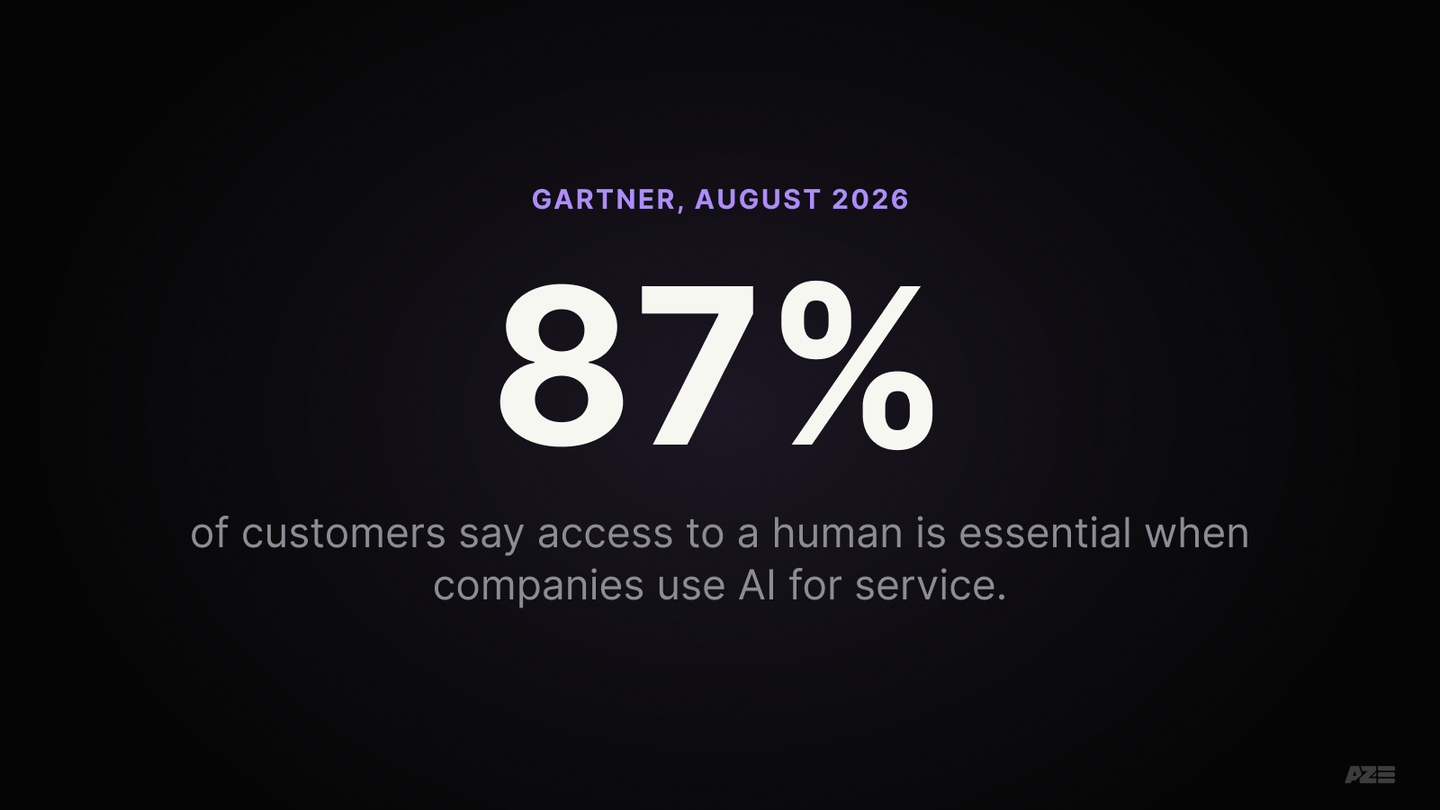
Customers prefer a capable, kind human, and they want to know one is reachable. In Gartner's 2026 survey, 87% of customers said access to a human is essential. The same survey found 50% say AI makes their interactions easier.
The detail that matters is in that first line: capable and kind. Not every human on the phone is either.
In September 2026, I called a longevity clinic. While I was spelling out my name, the woman who answered said, "Okay, just hurry up." She couldn't book an appointment. She couldn't tell me what the consultation costs. She couldn't schedule anything. All she did was take my information so someone else could call me back.
For that job, I'd rather talk to AI. A well-built one would be polite, get my details right, and could answer the price question too.
I'm not alone. In an Ada and NewtonX survey of 2,000 consumers (vendor research, March 2026), 59% said they'd rather get instant 24/7 help from AI than wait for a person, as long as the AI resolves the issue.
So the real question isn't human vs AI. It's which human and which AI.
What happens to the calls nobody answers?
Most callers move on to a competitor, and the business never finds out. In CallRail's 2025 survey of 1,000 US consumers (vendor research), 78% said they've abandoned a business after an unanswered call and 82% said they'd call a competitor instead.
Speed matters as much as answering. Harvard Business Review's audit of 2,241 US companies found that 23% never responded to a new lead at all, and firms that responded within an hour were about seven times as likely to qualify the lead as firms that waited longer.
Adam Loewy, a personal injury lawyer in Austin, shared a clear example on LinkedIn. A New York attorney called him after hours to refer a case and said: "I've called five or six Austin lawyers. You're the first one who called me back." The case settled two months later for $100,000.
The other five or six firms didn't lose that case to AI. There was no AI. The call went to a voicemail, a form or an inbox, and nothing carried it back to a person in time.
I see it as a customer too. I tried to buy a Knicks jersey in Miami the week they won the championship. I called three local stores with two questions: are you open, and do you have Knicks jerseys? None answered. We drove to one. It had been open the whole time.
I spent years in growth marketing, spending millions of dollars to get phones to ring. When sales slowed, everyone blamed the leads. Almost nobody listened to the calls, checked how long follow-up took, or asked whether anyone answered at all.
And the callers are changing. Since July 2025, Google Search can call local businesses with AI to ask about pricing and availability for its users. Invoca's analysis (vendor research) found 26% of those calls went unanswered and about half of the businesses that picked up gave no price. That's a customer asking a question, through a machine, and hearing nothing useful back.
Here's how the options compare:
| Capable, kind human | Properly set-up AI front desk | One-click AI setup | Voicemail / nobody | |
|---|---|---|---|---|
| Answers after hours and on weekends | Only if you staff it | Yes | Yes | No |
| Knows your hours, services, prices and policies | Yes | Yes, from a knowledge base you built | Only what's on your website | No |
| Complex, emotional or high-value calls | Best option | Warm transfer to a person, with context | Takes a message, or loops | No |
| Captures details into your CRM and calendar | Depends on the person and the process | Yes | Rarely | Often lost |
| Messages, chat, email, social DMs | One channel at a time | All of them, in one queue | Usually phone only | Unread for days |
| When it goes wrong | A bad day | Caught in weekly call review | The caller hangs up and you never know | Silence |
Why do so many AI receptionists feel so bad?
Because most of them were set up in minutes, not designed. The market is flooded with one-click tools and resellers, and customers are judging all AI receptionists by the worst ones. Most bad experiences come from skipped steps, not from AI itself.
The tools make it look easy. On September 16, 2026, ElevenLabs launched an AI receptionist product with the line: "Set up in minutes just by adding your website." An independent review pointed out what a website-only setup misses: cancellation policies, service areas, Sunday hours, and anything else a business never wrote down.
A wave of new agencies is reselling those setups. A viral post on X listed "AI Receptionist for Local Businesses" as a startup idea you can "build and resell" (776,000 views). One agency owner wrote on Reddit that "every man and his dog is starting an AI agency right now," described aiming to go live within 7 days "even if it's not perfect," and admitted a one-size template failed because every trade is different.
Customers feel the result, and they don't give second chances. Gartner found that only 27% of customers would try a chatbot again after a bad experience. Every badly built receptionist makes the next one harder to accept.
Look at the complaints people post, and each one points to a step someone skipped:
- No way to reach a person. A dental patient in New Zealand said their dentist's AI "makes you stay on the phone and answer questions even if I say I want to talk to a human." They switched practices. (Missing: escalation rules.)
- A ready buyer told to wait. An HVAC company lost a full-system replacement when the AI couldn't answer specific questions and said someone would call back. The caller hired a competitor. (Missing: routing rules for high-value calls.)
- It pretends to be human. Callers to car dealerships in the Sacramento area reported an AI claiming to be "someone at the front desk," with fake background noise. (Missing: disclosure.)
- It can't understand the caller. Patients at GP practices in Rotherham told a health watchdog the AI couldn't understand their Yorkshire accents. One said: "I ended up just hanging up and not bothering to try and book an appointment." (Missing: testing with real callers.)
A developer who built an AI receptionist for a dental clinic put it well: "Speech recognition and text generation weren't the hard parts. The hard part was building the decision logic."
What does a proper AI receptionist setup look like?
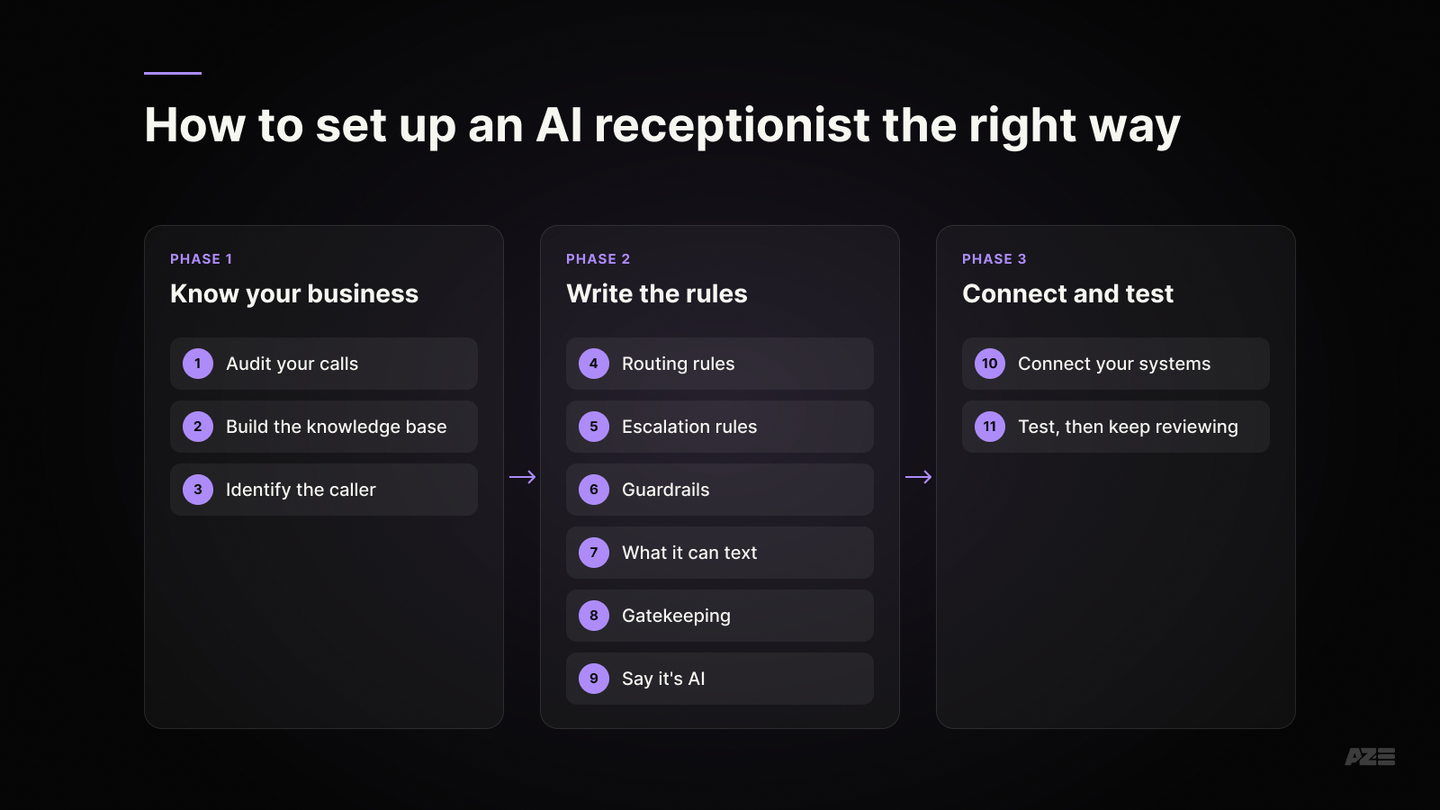
A proper setup starts with your business, not the software. You build a knowledge base, decide how callers are identified, routed and escalated, set what the AI can say and text, connect it to your CRM and calendar, and test it with real calls before and after launch. The AI becomes your front desk and your gatekeeper.
Here's the setup we follow for every AZE AI front desk:
- Audit your calls first. Look at 30 days of calls: how many go unanswered, when, and the 10 to 20 most common reasons people call. Start where AI replaces a dead line (after hours, overflow) before it touches your busiest hours.
- Build the knowledge base. Your hours and holidays, the services you offer and exactly how you deliver them, your service area, contact details, pricing policy (real ranges, or "we quote after a visit"), cancellation policy, and the answers to questions your website never covers. A website-only knowledge base misses most of this.
- Identify the caller. New customer, existing customer, or potential client? Look them up in your CRM by phone number. At the start, route potential clients straight to a person. Existing customers with routine requests can be handled by the AI or connected to your systems.
- Write the routing rules. Which requests go where: bookings to the calendar, billing questions to the office, urgent issues to the on-call person, referrals flagged as priority.
- Write the escalation rules. Who gets transferred, when, and how. Emotional, sensitive, unusual or high-value calls go to a person, live. A good transfer passes along what the caller already said, so they never repeat themselves. If nobody is available, the AI gives a real callback time and alerts the right person immediately.
- Set the guardrails. What it must never do: invent prices, give medical, legal or financial advice, or promise anything outside your policy. Without guardrails, voice agents eventually do all of these. When it doesn't know, it says so and gets a person.
- Decide what it can text. Menus, links, confirmations, intake forms. Business texting in the US has rules: registered numbers, recorded consent and a working STOP option.
- Make it a gatekeeper. Not every caller is a customer. Americans received 3.9 billion robocalls in August 2026 alone (vendor data), and AI agents like Google's now call businesses to ask about prices. Decide which calls get screened out, which get a ready answer (like your pricing policy), and which reach a person.
- Say it's AI. Tell callers up front, and always answer honestly if asked. It builds trust, and it's increasingly the law: the EU AI Act requires it from August 2026, and Maine passed a disclosure law in 2025 that covers voice AI.
- Connect it to your systems. Real-time calendar booking and rescheduling, every call logged in your CRM with a summary and outcome, and a short daily summary to you or your team.
- Test, then keep reviewing. Before launch, run test calls with off-script questions, interruptions, accents, angry callers and emergencies. After launch, review transcripts and transfers every week and fix what breaks. Gartner's advice: prioritize reliability over reach.
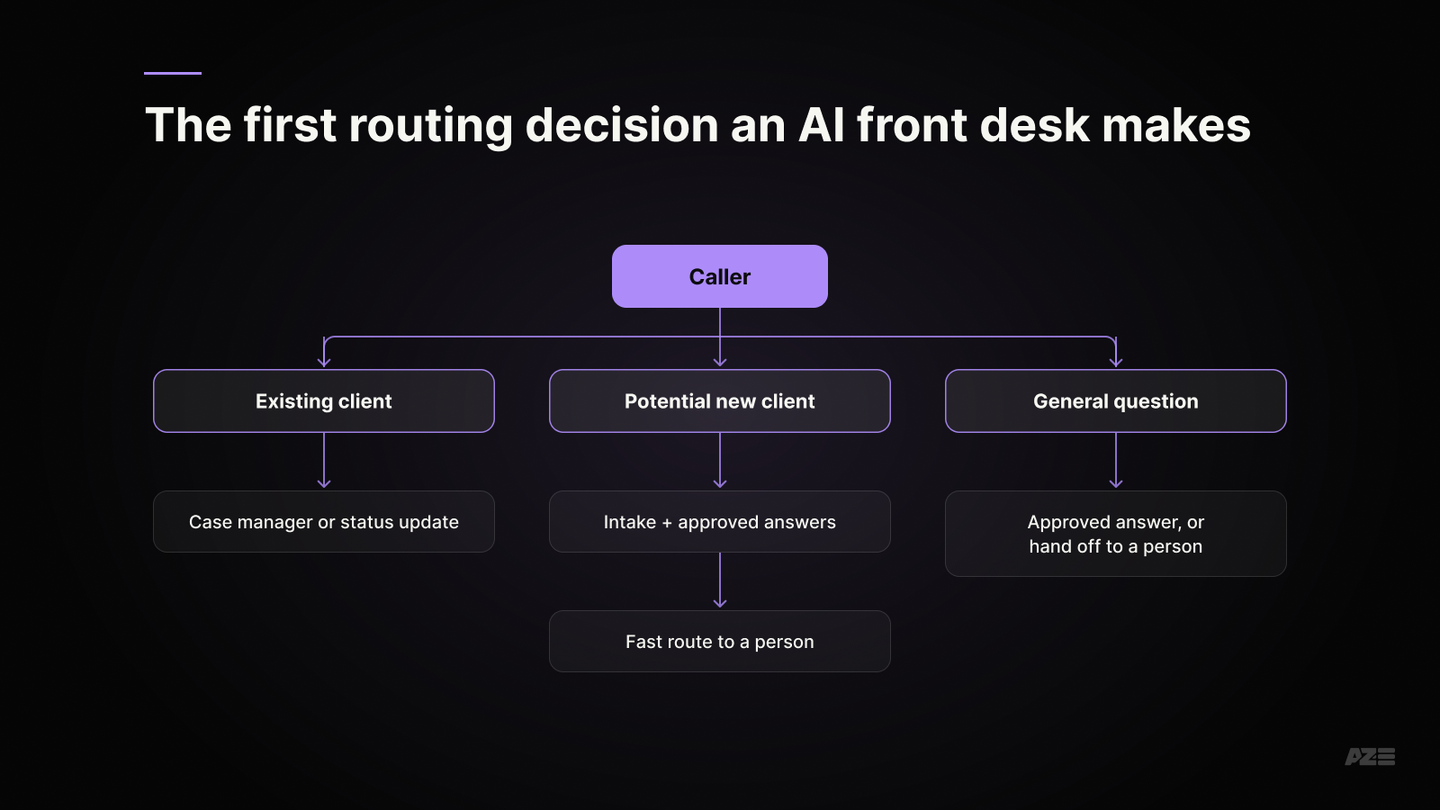
Take a law firm. The first thing the AI works out is whether the caller is an existing client or a potential new one, because they need different paths. An existing client may need their case manager or a status update through a set procedure. A potential new client needs intake, plus answers the firm has approved, and a fast route to a person. Everything else routes to a person too. You can hear how that sounds in our law-firm demo.
That takes a real knowledge base, routing rules, integrations and ongoing review. It can't be done by scraping a website on Tuesday and launching on Wednesday.
When should a human answer instead of AI?
A person should answer when a capable one is available, when the call is emotional, sensitive or unusual, and when a buyer with a big purchase needs specific answers right now. A properly set-up AI routes those calls to a human immediately instead of putting them on a callback list.
The HVAC caller is the clearest case. The AI didn't fail because it answered. It failed because nobody had written a rule that said "a caller asking about a full system replacement rings a person's phone right now."
Two more cases where a person has to be one step away:
- People the system can't understand. Accents, speech differences, a bad connection. Test for them, and keep a keypad or "staff" option that always works.
- People who can't talk easily. Illness or a disability shouldn't block anyone from booking.
And if you already have a person who always picks up, knows your customers and treats them well, keep them. Use AI to cover the hours and channels they can't.
Is an AI receptionist only for phone calls?
No. Customers also send Instagram DMs, reply to emails, use website chat, text, and message on WhatsApp, often after hours or from another time zone. A properly set-up AI front desk brings all of those into one system with the same knowledge base and the same rules.
It doesn't need to answer everything to be useful. Someone might write at midnight: "I'm visiting from New York next week and need help figuring this out. Can somebody text me when you have an answer?" The AI captures the question, organizes the details, routes it, and puts it in the morning queue. Your team starts the day with a clear list instead of six inboxes and a pile of voicemails.
The goal isn't to automate every conversation. It's to stop losing them.
Can an AI receptionist close the sale?
Not yet, and it shouldn't try. In a high-trust business like law, the relationship belongs to a person. The AI's job is to make sure the opportunity reaches that person fast, with the right context, before the caller moves on to the next name on the list.
Go back to Adam's referral. The AI doesn't need to convince the referring attorney or pretend to be a lawyer. It needs to:
- Answer the call
- Recognize that it's a referral
- Collect the right information
- Flag it as urgent so the right person follows up fast
The human still builds the relationship. AI makes sure the opportunity doesn't disappear before the human knows it existed.
Key takeaways
Bad setups, not AI. Customers don't hate AI receptionists; they hate badly set-up ones, and the market is full of them.
Kind and capable wins. A capable, kind human still wins. A rushed human who can only take a message doesn't.
The real competitor. For most businesses, AI's real competitor is the unanswered phone.
Set it up properly. A real knowledge base, caller identification, routing and escalation rules, guardrails, texting rules, gatekeeping, disclosure, system integration and ongoing testing.
Always a way out. Give callers a fast, live path to a person.
Talking to a wonderful human is better than talking to AI. Talking to nobody, or to someone who tells you to hurry up, is a very low bar. A properly set-up AI front desk clears it every time.
How does AZE set up an AI front desk?
We follow the same steps for every business, so nothing gets skipped:
- We audit your systems. Your phones, CRM, calendar, inboxes and forms, and how calls and messages move through them today.
- We work through it with you, hands-on. A guided session where we finalize your processes together: who calls, why, what your front desk should do, and when a person takes over. This is how the receptionist gets trained.
- We gather and build the training ourselves. The knowledge base, scripts, routing and escalation rules. Hands-off for you.
- We build it, connected to your phone line, CRM and calendar.
- We test it. QA with test calls and edge cases before any real caller hears it.
- We roll it out slowly. After hours first, then overflow, then your main line, reviewing calls at every stage.
I wrote the longer, personal version of this on Substack: https://azizaazimova.substack.com/p/why-ai-shouldnt-answer-customer-questions
Start with a systems audit
We'll look at how calls and messages reach your business today and show you where an AI front desk fits, and where it doesn't.
Sources
- Gartner, "87% of customers say companies using GenAI for customer service must provide access to a human agent" (August 4, 2026)
- Gartner, "Only 27% of customers would try a chatbot again after a negative experience" (September 2, 2026)
- Ada / NewtonX consumer survey (vendor research, March 24, 2026)
- CallRail, missed-call consumer survey (vendor research, September 2025)
- Oldroyd, McElheran and Elkington, "The Short Life of Online Sales Leads," Harvard Business Review (March 2011)
- Adam Loewy, LinkedIn post on a $100,000 referral from a returned after-hours call
- Google, AI calling local businesses from Search (July 16, 2025)
- Invoca, study of Google AI pricing calls (vendor research, 2025)
- ElevenLabs on X, launch of Reception (September 16, 2026)
- explainx.ai, review of ElevenLabs Reception (September 17, 2026)
- Post on X listing AI receptionists as a resell startup idea (May 2026)
- r/EntrepreneurRideAlong, AI automation agency owner (2026)
- r/Wellington, "Local dentist using AI receptionist - what do people think?" (September 13, 2026)
- r/PickAorB, "Our HVAC company lost a big job after we switched to an AI receptionist" (September 17, 2026)
- r/Sacramento, "Hyundai AI receptionists pretending to be real people" (June 24, 2026)
- The Guardian, "Frustrated GP patients hang up as Yorkshire accent baffles AI receptionist" (August 20, 2026)
- r/n8n, builder of a dental clinic AI receptionist on decision logic (July 2026)
- Retell AI, warm transfer guide (vendor)
- Vapi, prompting guide on guardrails (vendor)
- Twilio, SMS compliance and A2P 10DLC in the US
- YouMail Robocall Index (vendor data, August 2026)
- European Commission, transparency obligations under Article 50 of the AI Act
- Cooley, "AI chatbots at the crossroads" on new state disclosure laws including Maine (October 21, 2025)